AWS data services and ECS connectivity
This guide provisions and connects the data services used by the reference ECS/Fargate topology. It covers Justflow's S3/DynamoDB control plane plus the optional application DynamoDB, Redis-compatible cache, and PostgreSQL resource providers. It complements the image, ECS, and activation procedure in AWS deployment.
The example data-service configuration, resource declarations, task definitions, runtime settings, security-group flows, and IAM policies are inputs to reviewed deployment tooling. Replace their placeholders with your deployment values. Justflow does not create cloud resources from workflow declarations. The example deployment uses application PostgreSQL, S3, SQS and HTTP; Redis and application DynamoDB remain optional. The application renderer omits their unused startup secrets/grants by default.
Service topology
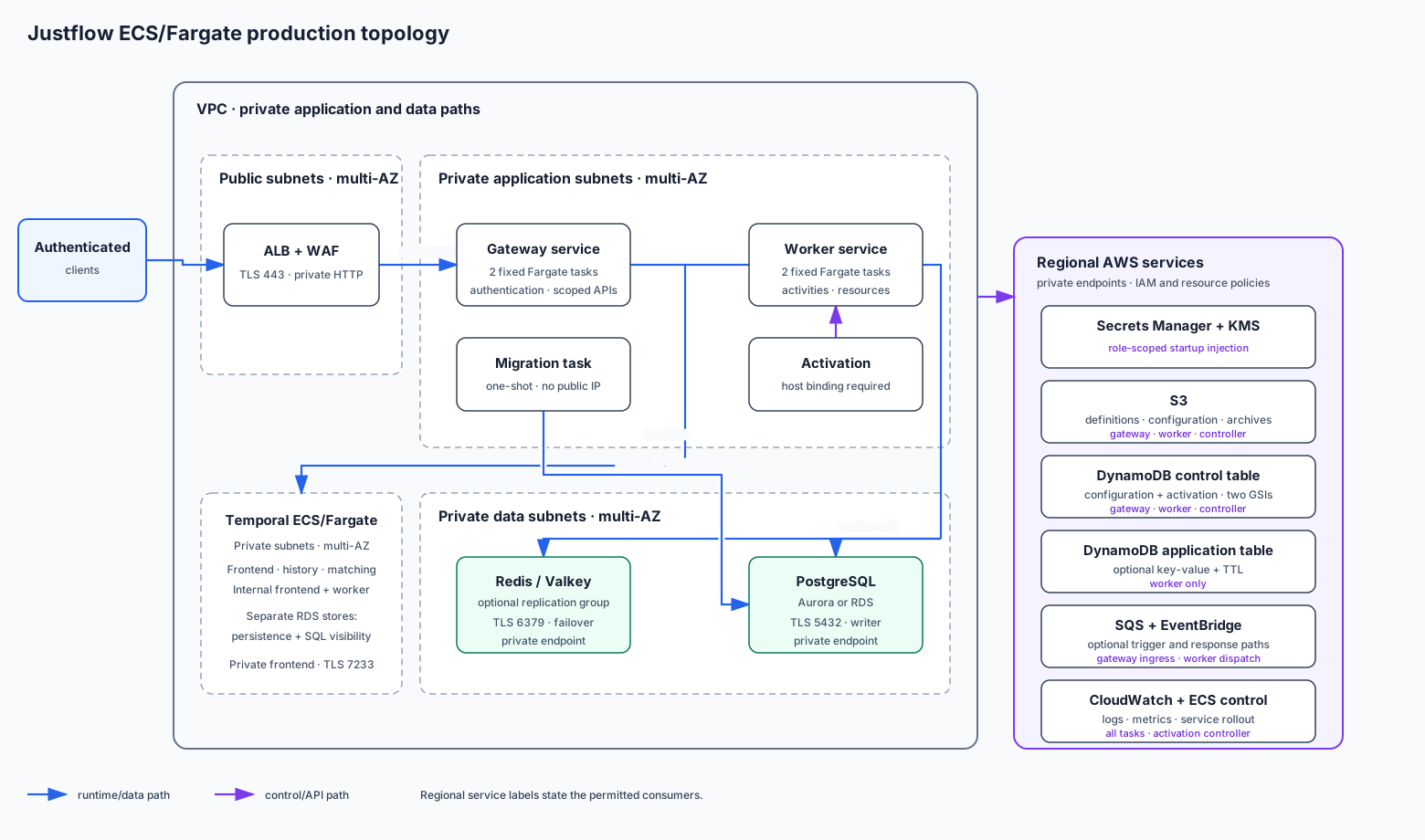
Only the ALB accepts public traffic. Gateway, worker, controller, and migration tasks have no public IP. The gateway owns authenticated ingress and the Justflow control plane; workers alone receive application database/cache credentials and security-group access. The one-shot migration task receives a separate PostgreSQL owner credential and cannot reach Temporal or the gateway.
Deployment order
Use one immutable environment name and placeholder set across every artifact. A complete deployment follows this order:
- Create the VPC, subnets, route tables, endpoints, DNS, and security groups.
- Create KMS keys, log groups, versioned S3 buckets, and the control-plane DynamoDB table.
- Create the optional application DynamoDB table, Redis replication group, and PostgreSQL cluster or instance.
- Create distinct runtime and migration credentials in Secrets Manager.
- Render and review IAM policies, runtime settings, resource declarations, and ECS task definitions together.
- Build and scan the final application image with the
aws,postgres, andredisextras, then resolve its immutable digest. - Run the database migration as a one-shot private ECS task and require a successful exit before changing services.
- Publish definitions/configuration, register exact task revisions, deploy worker and gateway services, and activate the selected revision.
- Verify service readiness and one synthetic workflow through the public API, then test backup restoration and failover separately.
Provision infrastructure through reviewed IaC or account-owned deployment tooling. Review its planned changes before applying them. The example configuration files do not create the infrastructure for you.
Network foundation
Use at least two availability zones:
- Public subnets contain only the ALB and required edge components.
- Private application subnets contain gateway, worker, controller, and
migration task ENIs. ECS services set
assignPublicIp=false. - Private data subnets contain Redis and PostgreSQL. Their route tables have no direct path from the internet.
- S3 and DynamoDB use route-table gateway endpoints with policies restricted to the rendered buckets and tables.
- SQS, Secrets Manager, KMS, CloudWatch Logs, ECR API/DKR, ECS control, and SSM use private interface endpoints where required by the host's egress policy. If controlled NAT egress is used instead, retain the same IAM and destination restrictions.
- Self-hosted Temporal frontends run in private ECS/Fargate subnets and accept verified TLS 7233 from gateway/worker security groups. Temporal internal services and persistence/visibility PostgreSQL are separate private boundaries; see the runbook.
The minimum application flows are:
| Source | Destination | Port | Permission |
|---|---|---|---|
| Internet | ALB | 443 | HTTPS only, with WAF/authentication policy |
| ALB security group | Gateway task security group | 8080 | Gateway ingress and probes |
| Gateway and worker task security groups | Temporal endpoint | 7233 | TLS only |
| Gateway and worker task ENIs | S3/DynamoDB gateway endpoints | 443 | Endpoint policy plus IAM |
| Gateway and worker task ENIs | Approved AWS interface endpoints | 443 | Endpoint policy plus IAM |
| Worker task security group | Redis security group | 6379 | TLS cache/key-value traffic |
| Worker task security group | PostgreSQL security group | 5432 | TLS runtime SQL traffic |
| Migration task security group | PostgreSQL security group | 5432 | TLS DDL/migration traffic |
Do not grant the gateway, ALB, or internet a route or security-group rule to Redis or PostgreSQL. A security-group reference is preferable to an application subnet CIDR because it follows only the intended task ENIs. DynamoDB and S3 are regional services; they do not receive inbound rules in the data security groups.
Justflow control-plane DynamoDB
The AWS configuration and activation implementations use one table, not separate configuration and activation tables. Create it with:
| Setting | Required value |
|---|---|
| Table | ${CONFIGURATION_TABLE} |
| Billing | On-demand (PAY_PER_REQUEST) unless measured capacity justifies provisioned mode |
| Partition key | scope_key (S) |
| Sort key | metadata_key (S) |
| Revision GSI | ${CONFIGURATION_REVISION_INDEX}: scope_digest (S) + revision_order (S), projection ALL |
| Activation GSI | ${CONFIGURATION_ACTIVATION_INDEX}: scope_digest (S) + activation_order (S), projection ALL |
| Encryption | Customer-managed KMS key ${CONFIGURATION_KMS_KEY_ARN} |
| Recovery | Point-in-time recovery enabled |
| Deletion | Deletion protection enabled; ordinary runtime roles have no table-administration actions |
Both GSIs are intentionally sparse. Draft and active-pointer items omit the
index sort attributes; revision records contain revision_order, while
activation records contain activation_order. Do not add a TTL attribute to
this table: retention is an explicit, relationship-aware application operation.
Use the same table and index names in
JUSTFLOW_CONFIGURATION__TABLE_NAME,
JUSTFLOW_CONFIGURATION__REVISION_INDEX_NAME, and
JUSTFLOW_CONFIGURATION__ACTIVATION_INDEX_NAME. Configuration bodies remain
immutable objects in the configuration S3 bucket; the table stores metadata,
optimistic-concurrency state, and active pointers.
The configuration-authoring, activation-controller, gateway, and worker roles have different actions against this table. The worker needs consistent reads at startup, while authoring and activation roles need bounded conditional writes. Do not grant table creation, deletion, backup administration, or unrestricted scans to application task roles.
Optional application DynamoDB
The built-in dynamodb resource provider is a separate application key-value
store. Create ${APPLICATION_STATE_TABLE} only when a workflow declares that
provider. Its reference schema is:
| Attribute | Type and purpose |
|---|---|
entry_key |
String partition key; Justflow prepends the configured key_prefix |
value |
Canonical strict-JSON text managed by the provider |
expires_at |
Optional numeric epoch-seconds TTL written only for bounded TTL operations |
Use on-demand billing, KMS encryption, PITR, and deletion protection. Enable
DynamoDB TTL on expires_at, but never rely on eventual TTL deletion for
authorization or business correctness. The worker task role needs only
GetItem, PutItem, and DeleteItem on this exact table. Gateway and migration
tasks receive no application-table permissions.
Redis-compatible cache
The built-in redis provider uses the standard Redis protocol and is not a
Redis Cluster client. Provision one cluster-mode-disabled replication group
with at least one replica in another availability zone, automatic failover,
Multi-AZ placement, at-rest encryption, transit encryption, and authentication.
Valkey or Redis engine versions compatible with the installed redis client
are valid; pin and test the chosen engine version in deployment CI.
Place the replication group in a data subnet group. Its security group accepts TLS port 6379 only from the worker task security group. Use the primary endpoint, not a node address, so failover does not require configuration changes. Configure maintenance windows, snapshots when recovery of cached state matters, and alarms for memory pressure, evictions, replication lag, connection count, and failover events.
Store a raw URL shaped like
rediss://username:password@primary-endpoint:6379/0 in the rendered Redis
connection secret. Percent-encode credential characters that are reserved in a
URL. The rediss scheme is required by the reference resource declaration;
the final image must contain a trusted CA bundle and must not disable
certificate verification.
Inject that secret into the worker container as
JUSTFLOW_RESOURCE_CONNECTIONS__REDIS_URLS__application. The application
suffix is the runtime binding name referenced by the resource YAML. Do not
inject the value into gateway tasks, bake it into an image, write it to a
declaration, or print it in deployment output.
Set each Redis resource's key_prefix to a stable environment/scope prefix.
Size the service so maximum worker tasks × resource max_connections, plus
administrative headroom, stays below the cache connection limit. Load-test
failover and retry behavior before production.
PostgreSQL on Aurora or RDS
The built-in postgresql provider uses asyncpg. Provision either Aurora
PostgreSQL or RDS for PostgreSQL in a private DB subnet group spanning at least
two availability zones. Use a supported, pinned engine major version with:
- no public endpoint;
- Multi-AZ or multi-instance failover appropriate to the selected service;
- KMS storage encryption and encrypted snapshots;
- TLS required by the database parameter policy;
- automated backups with at least the reference seven-day retention;
- deletion protection and a separately tested restore procedure;
- exported database logs and alarms for CPU, storage, connections, replication, failover, and transaction age.
The PostgreSQL security group accepts port 5432 only from the worker and migration task security groups. Use the cluster writer endpoint for Aurora or the stable primary endpoint for RDS. Do not put a database endpoint behind the public ALB.
Keep three identities separate:
- The managed master credential is retained for break-glass administration and is never injected into application tasks.
- A migration owner can apply reviewed DDL through a one-shot ECS task. Its secret is inaccessible to gateway and worker roles.
- A runtime application role has only the schema/table privileges required by workflow activities. It cannot create roles, databases, or extensions.
Store the runtime DSN as a raw secret shaped like
postgresql://user:password@writer-endpoint:5432/database?sslmode=verify-full.
Include the required CA trust in the final image and test hostname verification
against the selected endpoint. Inject it into the worker as
JUSTFLOW_RESOURCE_CONNECTIONS__POSTGRES_DSNS__application.
Justflow does not own application schema migrations. Run an idempotent, versioned migration command from the final application image (or a separately pinned migration image), wait for a successful ECS task exit, then roll worker tasks. A failed migration stops deployment; it must not be hidden by starting workers against an unknown schema. Prefer forward-compatible expand/migrate/ contract changes when old and new worker revisions overlap.
Budget database connections before scaling: maximum worker tasks ×
max_pool_size plus migration and operator reserves must stay below the
database connection ceiling. Add a compatible connection proxy only after
measuring the workload and replay/failover behavior.
Declare the application resources
Render application-resources.yaml into the application's selected immutable configuration revision. Its names align with the ECS secret bindings:
application_stateuses the optional application DynamoDB table;application_postgresresolves theapplicationPostgreSQL DSN; andapplication_cacheresolves theapplicationRedis URL and requires TLS.
Workflow grants still decide which steps may access each resource capability.
Declaring a resource does not grant IAM or network access. The final application
image must install the integrations it declares; the repository base image
contains the all extra, while a smaller downstream image can install
justflow[aws,postgres,redis] explicitly.
Inject secrets into ECS tasks
The ECS secrets field resolves a secret before the container starts. That read
uses the task execution role, not the application task role. Use separate
gateway, worker, and migration execution roles in addition to each role's
standard ECR-pull and CloudWatch-log permissions. Attach the matching sanitized
*-execution-secret-injection policy so the gateway execution role cannot fetch
database/cache secrets and application runtime execution roles cannot fetch the
migration owner credential. Supply the complete account-issued secret ARNs as
the reference placeholders; do not reconstruct an ARN from a secret name,
because Secrets Manager ARNs include an assigned suffix.
| Task | Injected values |
|---|---|
| Gateway | Its Temporal JWT and host credential grants |
| Worker | Its Temporal JWT, application PostgreSQL DSN, and Redis URL only when selected |
| Migration | Migration PostgreSQL DSN only, through its separate task definition |
The worker task role retains AWS API permissions used after startup, such as
S3, DynamoDB, SQS, or an explicitly selected aws_secrets_manager resource.
It does not need permission to read ECS-injected secrets. If an application
uses the secret-reader resource instead of runtime DSN/URL bindings, grant the
worker task role only the exact secret ARNs declared by that provider.
Encrypt secrets with ${SECRETS_KMS_KEY_ARN} and scope both Secrets Manager and
KMS resource policies to the intended execution role. Secret JSON used through
the secret-reader provider has the bounded form {"username":"...",
"password":"..."}; ECS-injected runtime bindings use the raw DSN or URL
described above. Do not mix those formats.
ECS secret injection is a startup snapshot. After rotation, register or select the compatible task definition and force a rolling replacement so new tasks read the new value. Keep the previous database/cache credential valid until new tasks are ready and old connections have drained, then revoke it. Never log the resolved Settings tree.
IAM boundaries
Use distinct roles even when the same image supplies several processes:
| Role | Data permissions |
|---|---|
| Gateway execution | Pull image/write logs through baseline policy; read only the gateway Temporal token and host credential grants |
| Worker execution | Pull image/write logs through baseline policy; read only the Temporal and application database/cache secrets |
| Migration execution | Pull image/write logs through baseline policy; read only the migration database secret |
| Gateway task | Read configuration/catalog state, write immutable environment snapshots, operate owned SQS ingress; no application DB/cache access |
| Worker task | Read configuration/catalog state, write immutable environment snapshots, access only declared application S3/DynamoDB/SQS resources; no RDS/Redis IAM grant is required because those are network/credential boundaries |
| Configuration authoring | Write immutable configuration bodies and conditional metadata only |
| Activation controller | Read configuration, publish definitions, update activation records, and roll only the worker ECS service |
| Migration task | Read only its migration secret and connect only to PostgreSQL; no Temporal, gateway, Redis, or application DynamoDB access |
The sanitized IAM fixture intentionally contains no static AWS keys and no table/bucket administration actions. Workload identity comes from the ECS task role. KMS key policies, Secrets Manager resource policies, S3 bucket policies, DynamoDB endpoint policy, and task-role IAM must all agree; an allow in only one layer is insufficient.
Offline validation before deployment
Render placeholders into an environment-owned directory outside source control. Validate the public fixtures and the rendered application declarations before creating or updating a task revision:
.venv/bin/python scripts/verify_aws_docs.py
.venv/bin/python -m justflow validate --config-dir rendered-configs --format json
The repository verifier checks role separation, exact DynamoDB keys/indexes, private Redis/PostgreSQL properties, TLS ports, secret placement, resource binding names, immutable image selection, and sanitization. It does not contact an AWS account or prove that rendered account resources exist.
Deployment and live verification
Before updating ECS services:
- Confirm the control table is active, both GSIs are active, PITR and deletion protection are enabled, and S3 bucket versioning/KMS policies are effective.
- Confirm the Redis primary endpoint resolves from a worker-subnet test task, TLS/authentication succeeds, and the gateway security group is rejected.
- Confirm the PostgreSQL writer endpoint resolves from worker and migration task subnets, TLS hostname verification succeeds, the runtime role cannot perform DDL, and the gateway security group is rejected.
- Run the migration task by exact image digest and require exit code zero.
- Register gateway/worker task revisions with the rendered settings and secret ARNs, update the services, and wait for stability.
- Check
/livez,/readyz, authenticated/healthz, and/metricsthrough the ALB. Worker readiness must include successful provider initialization; external dependency failures must not be converted into fabricated data. - Start a synthetic workflow that performs bounded write/read/delete checks against each enabled application resource. Use synthetic values only and remove them after the test.
- Inspect task startup failures, database/cache connection counts, endpoint policy denies, KMS denies, and CloudWatch logs. Verify that no DSN, URL, password, patient data, or raw tenant identifier was logged.
All live commands in AWS deployment are opt-in procedures against caller-owned resources. The repository never runs them as part of documentation verification.
Backup, failover, and restore
- Restore the configuration DynamoDB table and both S3 stores into an isolated environment, then verify active pointers, revision listings, definition digests, and KMS access before declaring the backup usable.
- Treat optional application DynamoDB TTL as lifecycle cleanup, not backup. Exercise PITR independently.
- Test Redis failover while representative activities retry. Decide explicitly whether cache loss is acceptable; do not claim durability from replication alone.
- Restore PostgreSQL from an automated backup or snapshot into an isolated subnet, run application integrity checks, and record measured RPO/RTO.
- Retain the previous application image, task definition, configuration and definition revisions, database schema compatibility, and credentials for the documented rollback window.
Failure and rollback boundaries
| Failure | Required response |
|---|---|
| Control-table/index creation incomplete | Do not publish or start services; correct the table/index contract |
| Redis or PostgreSQL provider initialization fails | Worker remains unready; fix network/TLS/secret state rather than bypassing readiness |
| Migration task fails | Stop deployment; preserve logs and leave existing services on the compatible schema/image |
| New worker revision is unhealthy | Let the ECS circuit breaker roll back; retain old credentials and schema compatibility |
| Secret rotation produces authentication failures | Restore the previous secret stage/credential, roll tasks, then investigate rotation ordering |
| Data-service failover exceeds retry/drain limits | Remove affected tasks from readiness, preserve Temporal durability, and recover the dependency without inventing workflow results |
Infrastructure provisioning, database schema ownership, credential rotation, backup/restore, capacity, and incident response remain deployment-operator responsibilities. Justflow validates and consumes the declared boundaries; it does not turn those operational controls into application guarantees.