AWS deployment
This guide describes deploying Justflow with separate gateway and worker services on ECS/Fargate and a private, self-hosted Temporal service. An authenticated ALB routes public requests to the gateway. S3 and DynamoDB store definitions and configuration, CloudWatch collects logs and metrics, and SQS/EventBridge can supply workflow events.
The example task definitions,
runtime settings,
data-service contract,
application resource declarations,
service configuration,
security-group flows, and
IAM policies are versioned templates with offline checks. Replace
every ${PLACEHOLDER} with a reviewed deployment value. The templates contain no real account
identities or credentials.
The self-hosted Temporal runbook records candidate pins, security, schema jobs, discovery, host/controller gates and live acceptance. The first deployment has not been validated on AWS. The application credential factory is executable; managed activation requires the consuming host bindings listed in that runbook.
Before you begin
Provision the VPC,
private subnets, ALB and authentication, ECR repository, versioned S3 stores, DynamoDB tables,
KMS keys, log groups, Temporal namespace, and the least-privilege roles represented by the
templates before running the AWS commands below. Use scripts/render_aws_reference.py for
application tasks, settings, and policies. Your infrastructure-as-code project must create the
infrastructure and Temporal services. Keep the rendered files with your deployment record.
The deployment sequence is: provision and verify the network/data services, build and verify one application image, push and resolve its digest, run application migrations, publish definitions and configuration, register exact ECS task revisions, activate the selected configuration, verify behavior, then retain the predecessor for rollback. Local evaluation is documented separately in run Justflow locally.
Single-host evaluation
A single private EC2 host can co-locate Justflow and Temporal for evaluation. It is non-HA: one host outage stops orchestration and execution. Use this setup only for evaluation and keep it private. The Temporal development server does not provide production durability.
Production topology
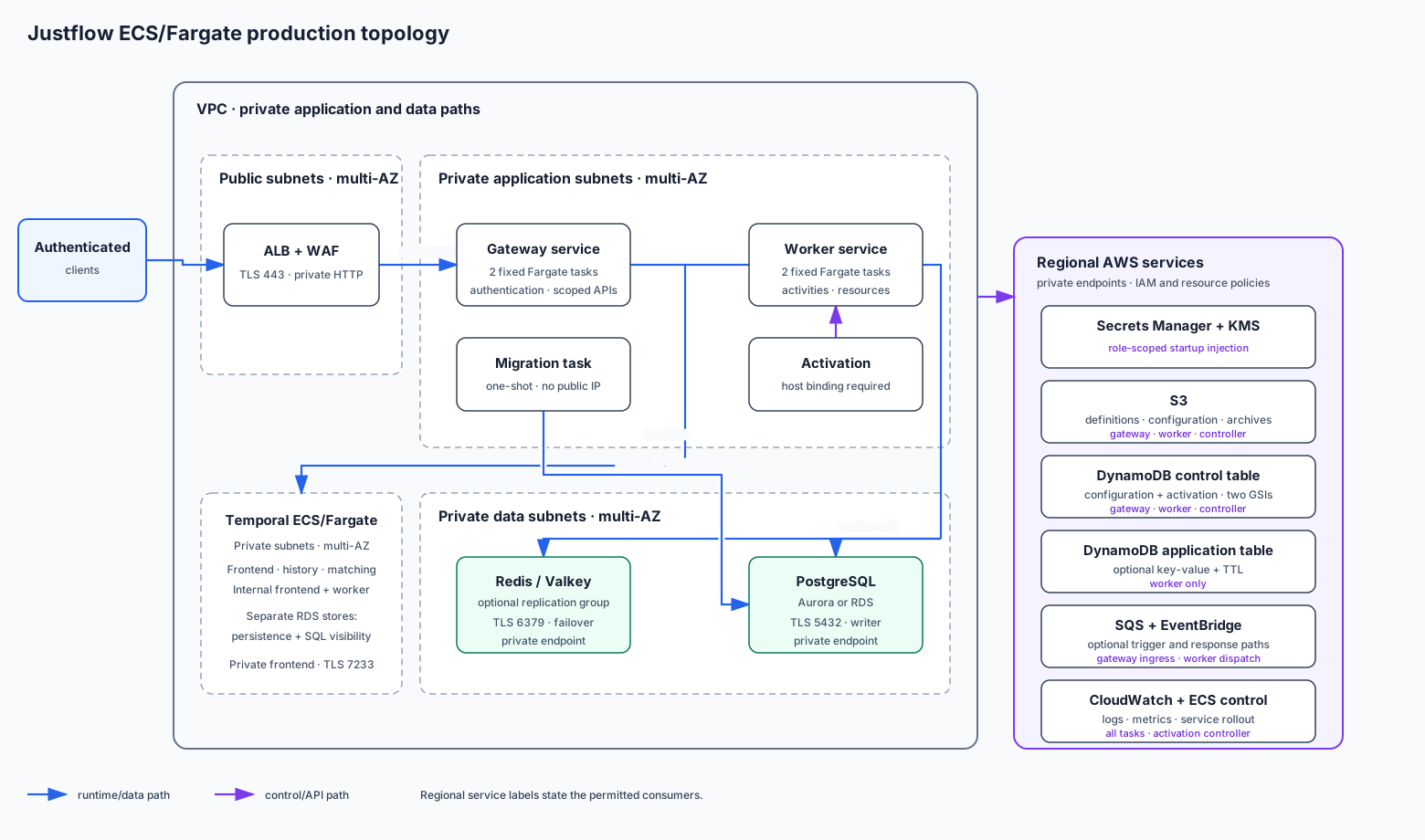
The complete VPC, DynamoDB, Redis, PostgreSQL, secret-injection, migration, and connection procedure is in AWS data services and ECS connectivity.
- Internet traffic reaches an ALB on TLS 443 with authentication, then only private gateway tasks on port 8080.
- Gateway and worker tasks have no public IP. Both reach private self-hosted Temporal frontends on verified TLS 7233. Internal Temporal services and their RDS stores are separate private boundaries.
- Gateway and worker capacity starts fixed at two tasks per role across availability zones. The service reference supplies native ECS CPU/memory alarms; advanced autoscaling needs measured capacity and an actual published metric.
- S3 stores immutable definition objects and configuration revision bodies with versioning, encryption, and backup. DynamoDB stores configuration metadata and activation records with PITR.
- CloudWatch receives logs and bounded metrics. SQS can carry trigger/response/action messages; EventBridge can target the trigger queue using the constrained queue resource policy.
EventBridge does not require an application task role action in this topology: the AWS service sends to SQS under the queue resource policy constrained by rule ARN. Task roles remain separated into configuration-authoring, activation-controller, gateway, and worker permissions. The ECS task execution role is separate again: it pulls the image, sends logs, and resolves only the secrets declared for that task revision.
Provision and connect data services
Create the data plane before registering application task definitions. The reference topology uses one DynamoDB table for configuration and activation metadata with separate sparse revision and activation GSIs. Optional application state uses a different DynamoDB table. Redis/Valkey and PostgreSQL live in private data subnets and accept TLS connections only from worker tasks; the one-shot migration task receives separate PostgreSQL owner access. Gateway tasks receive no application database or cache credentials. Use distinct gateway, worker, and migration task execution roles so each task can resolve only its own startup secrets.
Follow AWS data services and ECS connectivity for the exact table/index keys,
subnets, endpoint types, security-group flows, KMS and backup controls, Secrets Manager formats,
typed resource_connections, resource YAML, migration ordering, connection budgets, rotation,
failover, and restore verification. Render its sanitized artifacts together so an environment name,
table/index name, secret ARN, resource binding, task definition, and IAM policy cannot drift.
Build and publish one application image
Build the final host-application image from a Justflow base digest, scan and test that exact image, then push it to ECR. Never promote a different rebuild.
docker build --file examples/host_application/Dockerfile --build-arg JUSTFLOW_BASE_IMAGE=justflow@sha256:BASE_DIGEST --tag justflow-application:verification .
.venv/bin/python scripts/verify_container_images.py justflow-application:verification justflow-application:verification
The second command accepts two image arguments because the repository verifier checks base/reference roles together; deployment CI should provide its own final-image assertion if their layouts differ.
aws ecr get-login-password --region "${AWS_REGION}" | docker login --username AWS --password-stdin "${AWS_ACCOUNT_ID}.dkr.ecr.${AWS_REGION}.amazonaws.com"
docker tag justflow-application:verification "${AWS_ACCOUNT_ID}.dkr.ecr.${AWS_REGION}.amazonaws.com/${APPLICATION_NAME}:${SOURCE_REVISION}"
docker push "${AWS_ACCOUNT_ID}.dkr.ecr.${AWS_REGION}.amazonaws.com/${APPLICATION_NAME}:${SOURCE_REVISION}"
aws ecr describe-images --repository-name "${APPLICATION_NAME}" --image-ids imageTag="${SOURCE_REVISION}"
Record the returned sha256: manifest digest. Substitute its 64 lowercase hex characters into
APPLICATION_IMAGE_DIGEST; ECS task definitions must use repository@sha256:digest, never a tag.
Publish definitions and configuration
Apply the typed values from runtime-settings.json through ECS environment/task tooling. Inject the
role-specific Temporal JWTs and gateway credential grants, plus PostgreSQL and any selected Redis binding, through ECS
secrets. The task execution role resolves those values before startup; application task roles
supply AWS workload identity and never contain a static AWS access key.
Build or mount the verified Temporal CA file at TEMPORAL_ROOT_CA_PATH before startup.
Use the explicit host_application.production factories from the task references. See
authentication for origin/proxy settings and credential rotation.
Publish definitions with the configuration-authoring role before deployment. Dry-run migration is safe and read-only; live publication/migration is explicit cloud mutation.
justflow validate --config-dir configs --format json
justflow definitions migrate --config-dir configs --dry-run
justflow definitions migrate --config-dir configs
justflow definitions publish --config-dir configs
Use bucket versioning and DynamoDB PITR. Ordinary gateway/worker roles cannot rewrite arbitrary catalog objects or administer IAM/KMS/ECS.
Register and deploy ECS services
Render placeholders, validate the artifacts offline, register task definition revisions, then update
services by exact revision. Keep ALB deregistration delay and ECS stopTimeout at least the documented
60-second drain. The worker has no ALB target.
.venv/bin/python scripts/verify_aws_docs.py
aws ecs register-task-definition --cli-input-json file://rendered-gateway-task-definition.json
aws ecs register-task-definition --cli-input-json file://rendered-worker-task-definition.json
aws ecs update-service --cluster "${ECS_CLUSTER}" --service "${APPLICATION_NAME}-gateway" --task-definition "${GATEWAY_TASK_DEFINITION_REVISION}"
aws ecs update-service --cluster "${ECS_CLUSTER}" --service "${APPLICATION_NAME}-worker" --task-definition "${WORKER_TASK_DEFINITION_REVISION}"
aws ecs wait services-stable --cluster "${ECS_CLUSTER}" --services "${APPLICATION_NAME}-gateway" "${APPLICATION_NAME}-worker"
Activate safely
Your application's activation controller must implement and test the following steps before the
first deployment. Configuring AWS storage alone does not enable managed activation.
Configuration publication creates an immutable revision but does not change running behavior. The
activation-controller role invokes the host's WorkerDeploymentBinding to update only the
worker ECS service. The controller:
- plans against the expected active revision and records a lease;
- publishes/validates definitions and requests the exact worker task revision;
- waits for compatible workers to report readiness for the target definition/configuration;
- reconciles owned recurring schedules with a freshly confirmed plan;
- atomically advances the active revision and reports
applied; - records bounded failure or explicitly rolls back to the retained predecessor.
Call the versioned configuration plan/publish/activation API using request files generated from the OpenAPI contract. Do not embed example tenant payloads in deployment scripts. The browser can request an authorized activation through Justflow but receives no AWS credentials and cannot call ECS.
Verify health and behavior
Check public aggregate probes and authenticated health/metrics through the ALB. Use request files validated against OpenAPI to start a workflow. Test one-shot scheduled starts only after the authoritative production quota binding is installed; retain their idempotency keys and returned identities.
curl --fail "https://${APPLICATION_DOMAIN}/livez"
curl --fail "https://${APPLICATION_DOMAIN}/readyz"
curl --fail --header "authorization: Bearer ${OPERATOR_TOKEN}" "https://${APPLICATION_DOMAIN}/healthz"
curl --fail --header "authorization: Bearer ${OPERATOR_TOKEN}" "https://${APPLICATION_DOMAIN}/metrics"
curl --fail --header "authorization: Bearer ${OPERATOR_TOKEN}" --header "content-type: application/json" --data-binary @start-request.json "https://${APPLICATION_DOMAIN}/v1/workflows"
curl --fail --header "authorization: Bearer ${OPERATOR_TOKEN}" --header "content-type: application/json" --header "x-idempotency-key: ${SCHEDULED_START_IDEMPOTENCY_KEY}" --data-binary @scheduled-start-request.json "https://${APPLICATION_DOMAIN}/v1/scheduled-starts"
Inspect activation status, owned schedule reconciliation, task readiness, ALB targets, Temporal backlog, CloudWatch errors, and the returned workflow/scheduled-start identities. Live validation is an opt-in procedure against caller-owned AWS/Temporal resources.
Rollout and rollback
Roll forward by immutable image/task revision and configuration activation. ECS circuit breaker and rollback protect unhealthy tasks; configuration rollback is separate and explicit. Do not delete the previous image, worker build, definition, configuration/component revision, catalog object, or codec key until open workflows, pending scheduled starts, replay support, and rollback windows no longer depend on them.
Self-hosted Temporal operating procedure
Use the ECS/Fargate runbook for the selected topology, candidate image pins, SQL schema jobs, TLS/authorization, namespace features, recovery and acceptance evidence.